edc-pdf-reports
Reportlab/PDF classes for clinicedc/edc projects
Overview
This module offers functionality to link a PDF report to a model registered with ModelAdmin.
The CrfPdfReport class links a PDF report to a model registered with ModelAdmin. A link as is added
to the changelist that opens an intermediate page to ask for a password. From the intermediate page
a secure file is downloaded into the browser. See also PdfIntermediateView and PrintPdfReportView.
For this to work, you need to:
create a pdf report class;
declare the model with the
PdfReportModelMixinand set thepdf_report_clsattr on the model;declare the model’s ModelAdmin class with
PdfButtonModelAdminMixin;add
print_to_pdf_actionto Modeladmin.actions (required to print one or more pdfs using actions);add “pdf_button” to the list_display (required for pdf button to appear on each row);
update your app’s urls;
add edc_pdf_reports to INSTALLED_APPS.
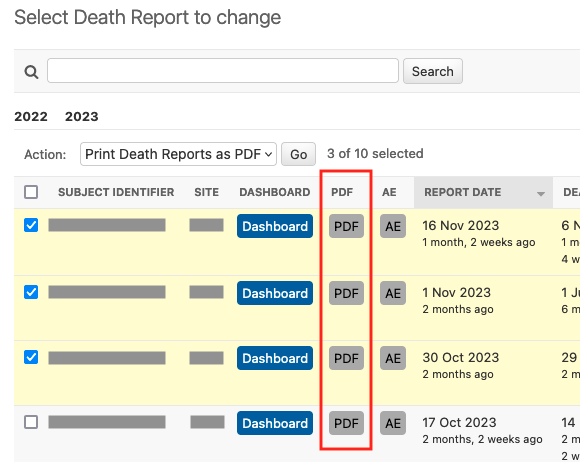
Your changelist will include options for printing one or many PDF reports into a password protected and secure PDF file.
If you are using this module outside of a clinicedc/edc project, you need to update two
settings attributes:
# settings.py
# tells edc_pdf_reports to not import two clinicedc modules
EDC_PDF_REPORTS_INTEGRATE_EDC = False
# points
EDC_PDF_REPORTS_TEMPLATES = {"pdf_intermediate": "edc_pdf_reports/generic_pdf_intermediate.html"}
DeathReport as an example
edc_adverse_event has this configured for its DeathReport model. Let’s use this as an example.
Create the DeathReport model:
# models.py

class DeathReport(PdfReportModelMixin, BaseUuidModel):

    pdf_report_cls = DeathPdfReport
Create the DeathPdfReport class. DeathPdfReport inherits from CrfPdfReport. Link the model and
changelist_url` to this PDF report class.
# death_pdf_report.py

class DeathPdfReport(CrfPdfReport):
    model = f"{get_adverse_event_app_label()}.deathreport"
    changelist_url = (
        f"{get_adverse_event_app_label()}_admin:{get_adverse_event_app_label()}_"
        "deathreport_changelist"
    )

    def get_report_story(self, **kwargs):
        story = []
        # ...
Declare the ModelAdmin class with PdfButtonModelAdminMixin:
# admin.py

@admin.action(permissions=["view"], description="Print Death Reports as PDF")
def print_to_pdf_action(modeladmin, request, queryset):
    return print_selected_to_pdf_action(modeladmin, request, queryset)


class DeathReportModelAdmin(PdfButtonModelAdminMixin, DeathReportModelAdminMixin):
    actions = [print_to_pdf_action]
    list_display = ["subject_identifier", "pdf_button", ...]
Update your url patterns:
# urls.py
url_patterns = [
    # ...,
    *paths_for_urlpatterns("edc_pdf_reports"),
    # ...
    ]
Add to settings:
# settings.py
INSTALLED_APPS = [
    # ...
    "edc_pdf_reports.apps.AppConfig",
    ]
Your changelist will have the new column “PDF” and the print as pdf action will be available.
The intermediate page, linked from the changelist, will look like this:
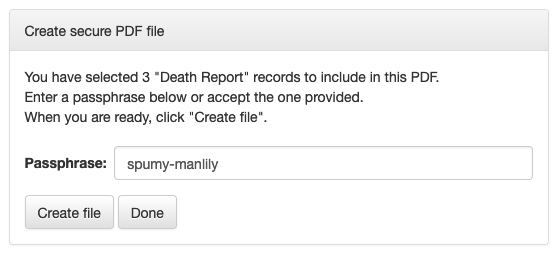
Note the passphrase and click “Create File”. The file will be created in the view and downloaded by the browser.
Creating a PDF file outside of the view
The view PrintPdfReportView uses function write_queryset_to_secure_pdf to create a PDF.
You can access this function directly.
For example:
import mempass
import tempfile
from pathlib import Path
from django.contrib.auth.models import User
from edc_pdf_reports.utils import write_queryset_to_secure_pdf, write_model_to_insecure_pdf
from effect_ae.models import DeathReport

dir = tempfile.mkdtemp()
p = Path(dir)
qs = DeathReport.objects.all()
user = User.objects.get(username="erikvw")

# create a secure PDF file for the queryset
q = p / "death_reports_secure.pdf"
password = mempass.mkpassword(2)
buffer = write_queryset_to_secure_pdf(queryset=qs, password=password, user=user)
q.write_bytes(buffer.getbuffer())
print(q)

# create an insecure PDF file for one model instance
q = p / "death_reports_insecure.pdf"
model_obj = qs[0]
buffer = write_model_to_insecure_pdf(model_obj, user=user)
q.write_bytes(buffer.getbuffer())
print(q)
Add watermark to report
When testing, you can add a watermark to the report. In your test settings set the following:
EDC_PDF_REPORTS_WATERMARK_WORD = "SAMPLE"
EDC_PDF_REPORTS_WATERMARK_FONT = ("Helvetica", 100)
The watermark prints at a 45 degree rotation across the center of each page.